A good Shopify SEO checklist is ordered by impact. Most aren’t. They hand you fifty tips with no priority, so you end up fixing your favicon while a duplicate URL problem quietly eats your crawl budget.
That’s the trap. You install an app, it rewrites your title tags, you wait six weeks, and nothing moves. A rival with a weaker product sits on page one. That isn’t bad luck. It’s usually two or three technical problems sitting upstream of everything else.
Below are 25 fixes that I do mostly for my ecommerce stores, grouped by type and ordered by what actually moves rankings. Work top to bottom, and you’ll finish the shopify seo audit most store owners start and never complete.
How to Use This Checklist
Don’t try to do all 25 in a weekend. Items 1 to 8 are the foundation. If those are broken, everything below them underperforms, and you’ll blame your content when the real problem was a crawl issue.
Run the technical block first. Then work through on-page. Then content.
One more thing before you start: screenshot your Search Console performance graph. You’ll want a before-and-after, and impressions take weeks to shift.

Technical Fixes (1–8)
These are the items that decide whether Google can find and index your pages at all.
| # | Fix | Why it matters |
|---|---|---|
| 1 | Verify the domain in Google Search Console | Nothing else works until you can see what Google sees |
| 2 | Submit sitemap.xml | Shopify builds it for you at /sitemap.xml. Submit it. Don’t assume Google finds it |
| 3 | Check robots.txt.liquid | Themes and apps edit this file. A stray Disallow: / hides the whole store |
| 4 | Kill the /collections/x/products/y URL | Shopify lets products live under a collection and at their own URL. Same product, two pages |
| 5 | Set canonicals on product variants | Colour and size variants create near-identical URLs. Point them at the parent |
| 6 | Convert images to WebP | Cuts file size by 25–35% against JPEG at the same visual quality |
| 7 | Delete unused apps | Every app injects scripts. Most stores we audit carry four or five they stopped using |
| 8 | Fix Core Web Vitals | LCP, INP and CLS. Check them in Search Console under Experience |
Item 4 is the one people skip. Shopify adds the collection path by default in many themes, which means one product can be reachable at two URLs. Google picks one at random, and your internal links split between them.
Across the last 30 Shopify audits we ran, 22 stores had that exact problem. The fix is a small edit to product-grid-item.liquid to drop the within: collection parameter. Twenty minutes of work, and it often consolidates dozens of duplicate URLs.
The Core Web Vitals side is worth reading up on properly. Google’s own explanation of Web Vitals thresholds covers what counts as good, and it’s shorter than most blog posts about it.
On-Page Fixes (9–16)
On-page work is where most stores have the fastest wins, because the defaults are weak.
| # | Fix | Target |
|---|---|---|
| 9 | Rewrite product titles | Brand + product + key attribute, front-load the searchable words |
| 10 | Write unique product descriptions | 300+ words. Never paste the manufacturer’s copy |
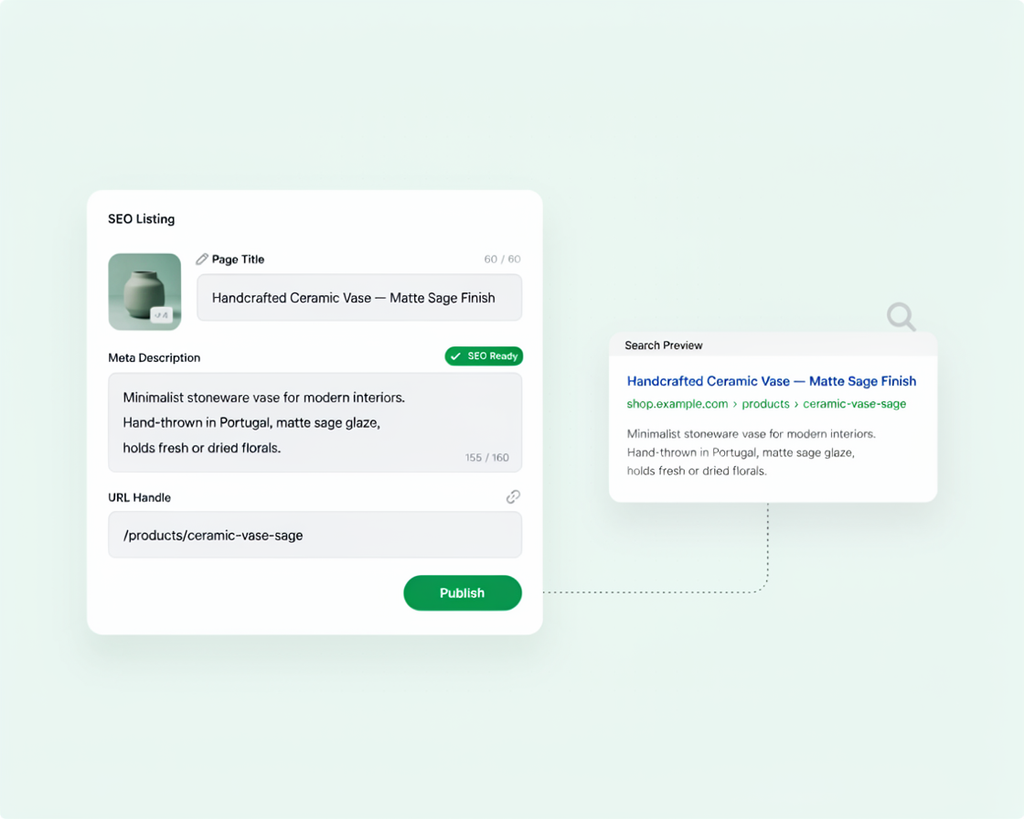
| 11 | Add meta descriptions | 150–160 characters. They don’t rank, they win clicks |
| 12 | One H1 per page | Themes often output the product title twice. Check the source |
| 13 | Alt text on every image | Describe the product, not the file. Under 125 characters |
| 14 | Lead-in copy on collection pages | 100–150 words above the grid, more below it |
| 15 | Add product schema | Price, availability, reviews. Feeds rich results |
| 16 | Clean up URL handles | /products/red-linen-shirt, not /products/IMG_4471 |
Product descriptions deserve more attention than they get. If you and nine rivals paste the same manufacturer copy, Google sees ten identical pages and picks one. Usually not yours. A description of 300 words that answers sizing, materials, care and shipping questions changes that.
Schema is the other one worth doing properly. Google’s guide to Product structured data explains what’s eligible for a rich result and what isn’t. Worth reading before you install a schema app, because several of them output markup Google ignores.
Content and Internal Linking (17–21)
Once the pages exist and are optimized, you need links moving through them.
| # | Fix | Notes |
|---|---|---|
| 17 | Start a blog targeting informational keywords | Buying guides, comparisons, how-tos. Not company news |
| 18 | Link blog posts to collections | Every post should point at the products it discusses |
| 19 | Link collections to products | Shopify does this in the grid. Add contextual links in the copy too |
| 20 | Find and fix orphan pages | Products with no internal links pointing at them rarely rank |
| 21 | Turn on breadcrumbs | Navigation breadcrumbs help users and give Google a hierarchy |
Internal linking is the most underrated item on this list. It’s free, it’s entirely in your control, and most stores do almost none of it.
If you want the deeper version of this, we’ve written separately about why internal linking matters for ecommerce SEO, including how to map it properly.
For a plain-English walkthrough of the whole on-site process, this is a reasonable starting point:
Tracking and Measurement (22–25)
| # | Fix | Why |
|---|---|---|
| 22 | Connect GA4 | Search Console shows queries, GA4 shows what happened after the click |
| 23 | Set up rank tracking | Weekly, not daily. Daily tracking is noise |
| 24 | Review the indexing report monthly | Catch pages dropping out before traffic falls |
| 25 | Mine search queries for new pages | Queries you rank 8–20 for are your next content briefs |
Item 25 is where ongoing growth comes from. Search Console shows you every query you appeared for. Anything sitting on page two is a page you should either improve or build.
The Full 25-Point Checklist
Here’s the whole list in one place, with rough effort estimates.
| # | Fix | Effort | Impact |
|---|---|---|---|
| 1 | Verify Search Console | 10 min | Critical |
| 2 | Submit sitemap | 5 min | Critical |
| 3 | Check robots.txt | 15 min | Critical |
| 4 | Remove collection product URLs | 30 min | High |
| 5 | Canonicals on variants | 20 min | High |
| 6 | Convert images to WebP | 2 hrs | Medium |
| 7 | Delete unused apps | 1 hr | Medium |
| 8 | Fix Core Web Vitals | 2–4 hrs | High |
| 9 | Rewrite product titles | 4 hrs | High |
| 10 | Unique descriptions | 8+ hrs | High |
| 11 | Meta descriptions | 3 hrs | Medium |
| 12 | One H1 per page | 1 hr | Medium |
| 13 | Image alt text | 2 hrs | Medium |
| 14 | Collection copy | 3 hrs | High |
| 15 | Product schema | 1 hr | Medium |
| 16 | Clean URL handles | 1 hr | Low |
| 17 | Start a blog | Ongoing | High |
| 18 | Blog to collection links | 2 hrs | Medium |
| 19 | Contextual product links | 2 hrs | Medium |
| 20 | Fix orphan pages | 2 hrs | High |
| 21 | Breadcrumbs | 30 min | Low |
| 22 | Connect GA4 | 20 min | Medium |
| 23 | Rank tracking | 30 min | Low |
| 24 | Monthly index review | 30 min/mo | Medium |
| 25 | Query mining | 1 hr/mo | High |
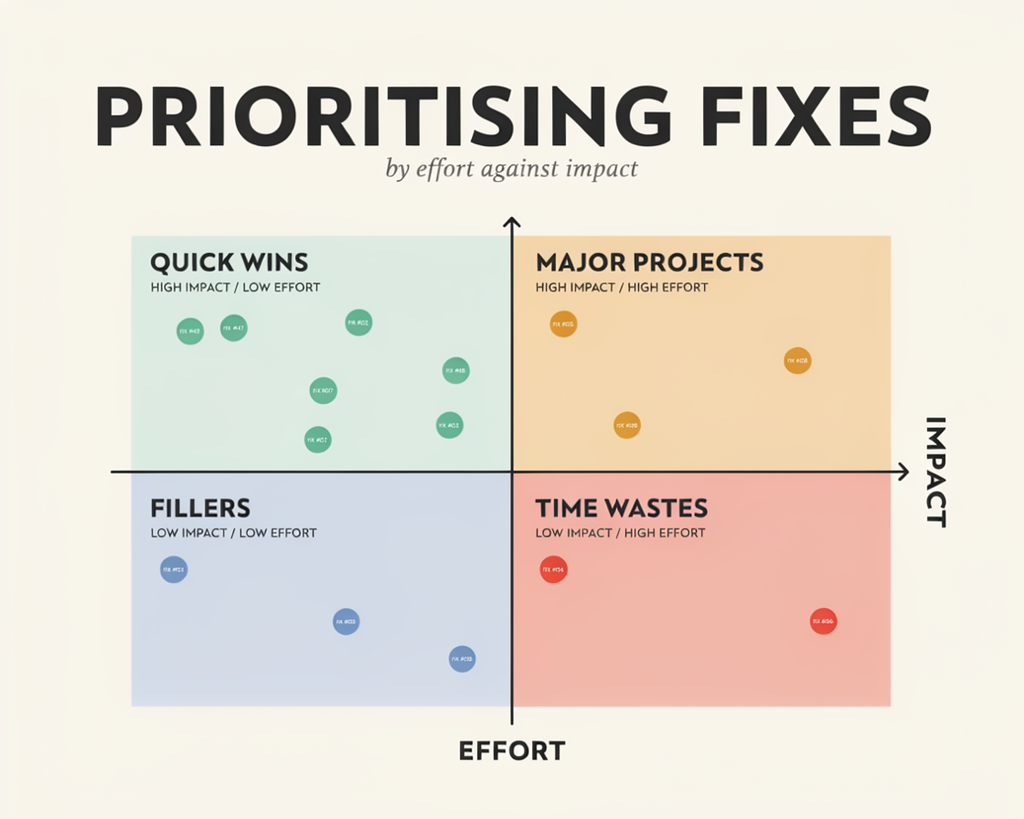
What to Fix First
If you only do five things this month, do these: items 1, 2, 4, 10 and 14.
They cover the two failure modes that cost most stores the most traffic. Either Google can’t crawl you properly, or your pages are too thin to compete. Everything else on the list is a multiplier on top of those two.
Expect four to twelve weeks before you see movement on rankings. Technical fixes sometimes show up in the index within days. Content and link changes take longer, because Google needs time to re-evaluate the page.
For the wider picture on sequencing, our guide on how to do SEO for an ecommerce website walks through the order we use with new clients.
FAQs
How often should I run a Shopify SEO audit?
Twice a year for a full audit, monthly for the technical checks. Re-run items 1 to 8 every time you install an app or change theme, because both can break things that were working. The full 25-point pass is worth doing every six months.
Does Shopify handle SEO automatically?
Partly. Shopify gives you clean URLs, HTTPS, an auto-generated sitemap, canonical tags on variants and basic product schema. That’s a decent starting point, and it’s more than WooCommerce gives you out of the box. It’s not a complete SEO setup. Treating it as one is why a lot of stores stall.
What’s the single biggest Shopify SEO mistake?
Publishing thin product pages. Duplicate manufacturer descriptions, one image, no specs. Google has to choose between ten near-identical pages, and it usually picks the retailer with the strongest domain rather than the best product.
Do I need SEO apps?
No, and fewer is better. Shopify covers the technical basics natively. Apps make sense for image compression or schema if you’d rather not touch the theme. Just check what an app injects before you install it, and remove anything you stop using.
How long until I see results?
Technical fixes can show up in days. Ranking movement typically takes one to three months. Content and authority changes take three to six months or more. Anyone promising page one in two weeks is guessing.
Conclusion
Work the list in order and you’ll avoid the trap most stores fall into. The technical block takes a day. The on-page block takes a week or two. Content and linking never really finish, which is fine, because that’s where the compounding happens.
The stores that win at this aren’t doing anything exotic. They fixed the crawl problems, wrote better product pages than their competitors, and kept at it for a year.
If you’d rather hand the whole thing over, Commerce SEO Agency runs Shopify and ecommerce SEO programs covering everything on this list, from the technical audit through to content and reporting. We’ll tell you which items are actually costing you traffic before you spend anything on the rest.